Bump Pulse: Contraction Timer
- 4.6
- Rating
- 10.00K
- Installs
- Free
- Price

 Analysis by App-foxy
When contractions begin to feel close enough to track, the hardest part is often not knowing what to record. It is staying calm, starting the timer at the right moment, and making useful sense of the pattern while also preparing for labor. Bump Pulse: Contraction Timer is built for that narrow but important job. I found it most useful as a focused labor companion rather than as a broad pregnancy information app: it keeps attention on contraction timing and adds a way for a partner to follow along live.
The app comes from Developer On Wheels and sits in the parenting category. It is free to install, with in-app purchases priced at $3.99 per item, and its Everyone age rating makes it approachable for a household where more than one person may need to use it. The current version is 3.5.0, and it runs on Android 7.0 or later. Its average rating is 4.6 from around 96 ratings, while the app has passed 10K+ installs. Those figures suggest a small but positive user base, which matches my impression of the product: it is a specialized tool with a clear purpose, not an overloaded platform trying to cover every part of pregnancy.
How I would use it from the first contraction to a useful pattern
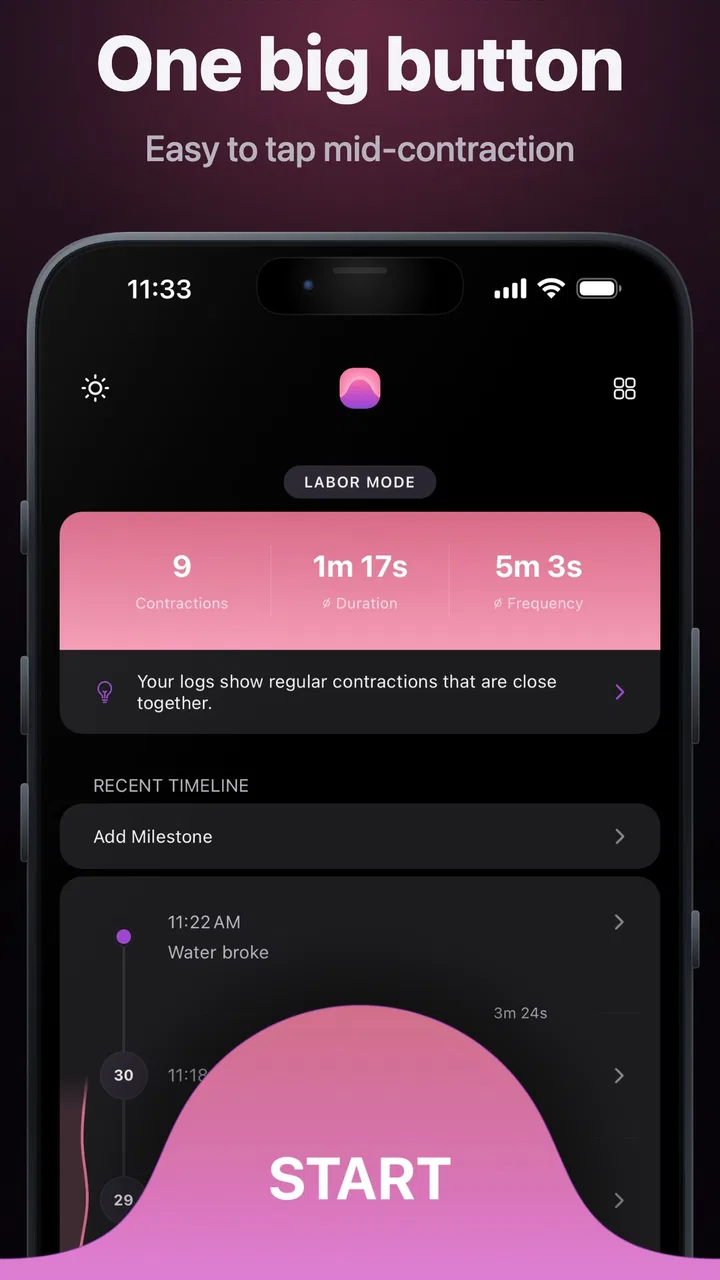
The basic workflow is refreshingly direct. When a contraction starts, I would open the timer and begin recording; when it ends, I would stop it. Repeating that process creates a running picture of duration and spacing instead of relying on memory. That distinction matters because early labor can feel irregular, and a single strong contraction does not tell you as much as a sequence recorded consistently.
You May Also Like

 Blood Strike: 2.5 Anniversary
Blood Strike’s Loadouts Turn Every Drop Into a Tactical Gamble
A close look at Blood Strike’s custom loadouts: how fast access to signature weapons reshapes its battle royale rhythm, rewards preparation, and narrows the gap between fights.

 Pandora - Music & Podcasts
Pandora’s Music Is Easy to Start, but Harder to Recover
Pandora’s strength is its low-effort path from a seed to a station. Its weak spot is how much confidence it asks you to place in connection, setup, and quiet recovery.

 8 Ball Pool
 Is Built on Rivalries, Rematches, and Routine
A close look at the rivalries, rematches, shared routines, and unanswered safety questions that turn a quick pool match into a persistent mobile community.

 Samsung Music
’s Quiet Strength Is Playing What You Already Own
Its reach comes less from spectacle than from dependable access to a personal library. That simplicity is both the app’s strongest retention engine and its ceiling.

 AccuWeather: Weather Radar
AccuWeather Review: A Quick, Clear Forecast for Everyday Decisions
For everyday plans, the best forecast is the one you can understand quickly. AccuWeather makes rain timing, radar, and local conditions easy to act on, with a few trade-offs.

 Hill Climb Racing
Why Hill Climb Racing Still Turns Crashes Into One More Run
A tiny car, a bumpy hill and one more upgrade: Hill Climb Racing keeps resurfacing because its simple chaos makes every near-miss feel personal.
More From Our News Desk
View All News


My advice is to decide on the recording habit before the sensations become intense. Choose one person to operate the phone whenever possible, and use the same start and stop rule every time. Starting at the first clear rise and stopping when the contraction has eased gives the log a consistent meaning. Switching between “when it feels uncomfortable” and “when it is clearly over” makes the results harder to interpret, even if the app itself records each event correctly.
A realistic scenario is a person resting at home while their partner sits nearby with the phone. The person in labor concentrates on breathing and changing position; the partner handles the timer and watches the developing rhythm. When the next contraction arrives, the partner records it without asking a string of questions. Between contractions, both people can look at the recent pattern and decide whether to continue resting, prepare to leave, or contact their care team based on the guidance they have already received.
That is where the live partner-sharing idea becomes more than a decorative extra. Labor often turns the person experiencing contractions into the least suitable person to manage a screen. Sharing the task lets the partner become the practical record keeper. It can also help when the partner is in another room gathering supplies or traveling to meet the user, although the usefulness of that arrangement depends on both people having reliable access to the app and a working connection. I would treat sharing as a convenience for coordination, not as a substitute for direct communication with a midwife, doctor, or hospital.
The app is also useful when the pattern is still uncertain. Early contractions may be far apart, and opening a dedicated timer can be less mentally demanding than trying to use a general stopwatch or notes app. A notes app can store times, but it usually leaves you to calculate the gaps and duration yourself. A generic stopwatch can measure one event, yet it does not naturally organize a series of contractions. Bump Pulse is better suited to repeated tracking because the act of recording is the central experience.
What to set up before labor becomes demanding
I would not wait until the most uncomfortable moment to explore the app. Install it earlier, open it once, and make sure the main timing action feels obvious. The goal is not to study every screen; it is to remove hesitation. If you need several attempts to remember how to begin or finish a contraction, that friction will feel much larger when you are tired or distracted.
It is worth checking the app’s available settings before relying on it. Keep the arrangement that makes the start and stop actions easiest to reach, and avoid changing the setup repeatedly once tracking has begun. Experienced users usually benefit from consistency more than customization: the same person operates the phone, the same gesture starts a contraction, and the same gesture ends it. Settings are valuable when they reduce decisions, not when they encourage constant adjustment.
Partner sharing deserves its own trial run. Decide who will initiate the shared session, who will record each contraction, and how you will communicate if one person loses access to the phone. A short practice at home can reveal a simple problem, such as the partner not knowing where to look for the live information. It also gives you a backup plan: if sharing becomes inconvenient, one person can continue timing locally while the other helps with comfort and preparation.
I would also check the phone itself. Keep it charged, remove unnecessary distractions, and place it somewhere reachable without forcing the person in labor to sit up. These are not special app functions, but they strongly affect whether a timing tool works in practice. A beautifully organized record is not helpful if the phone is across the room or the person tracking contractions has to search through unrelated notifications.
The free entry point is another practical advantage. Someone can try the core workflow before deciding whether any optional purchase is worthwhile. The $3.99 per-item in-app purchase model means I would look carefully at what an individual purchase adds and whether it solves a real need for your household. I would not pay simply because labor has started; the basic timing routine should already feel useful first.
Small habits that make the record more dependable
The first non-obvious lesson is that the person who feels the contraction and the person who records it should not automatically be the same person. If the user in labor is trying to breathe through a contraction, asking them to handle the phone can introduce missed starts and stops. A partner-operated routine produces a cleaner record and leaves the user free to focus on comfort.
The second is to avoid interpreting every individual entry. After each contraction, it is tempting to announce that it was longer or stronger than the last one. That can increase anxiety without adding much value. I prefer looking at a group of recent entries and discussing the general direction with the partner. The app can organize timing, but it cannot determine whether labor is progressing normally or whether medical attention is needed.
The third is to preserve a backup communication habit. Even with live partner sharing, say important changes aloud. If the person in labor reports new symptoms, unusual pain, bleeding, fluid loss, reduced fetal movement, or anything that worries them, the timer should not become the center of the decision. Contact the appropriate care provider or emergency service according to the instructions already given to you. A contraction tracker is a record-keeping aid, not a clinical assessment.
A fourth useful habit is to keep the tracking rule stable during transitions. If you move from resting to walking, showering, or preparing to leave, continue using the same start and stop points. Otherwise, a change in technique can look like a change in labor. When a hospital or birth center asks about timing, it is easier to explain a consistent method than to reconstruct several different methods from memory.
For a partner, the fastest pattern is usually simple repetition: notice the beginning, record it immediately, put the phone down, and return attention to the person. Do not spend the whole interval staring at the screen. The value of the app comes from a reliable history, not from watching every second in real time. Between entries, the partner can offer water if appropriate, adjust pillows, dim the room, or prepare the items needed for the next step.
Where this app is stronger than ordinary alternatives
Compared with a paper note, Bump Pulse reduces the burden of calculating intervals while events are happening. Paper can be perfectly adequate for someone who prefers writing, but it depends on remembering the exact times and keeping the page nearby. Compared with a general notes app, a dedicated contraction timer keeps the workflow centered on repeated events rather than mixing labor records with messages, lists, and unrelated information.
The live partner-sharing function is the clearest difference from a solitary stopwatch. It recognizes that labor is often managed by two people, even when only one person experiences the contractions. That makes the app especially appealing for couples who want one person to remain physically present while another partner, if needed, follows the timing remotely or helps coordinate practical decisions.
Still, a general timer may be better for someone who wants the smallest possible tool and already has a routine they trust. A paper method may suit people who dislike phones during labor or who want a physical record. A broader pregnancy app may be preferable if the main goal is education, appointment organization, or symptom journaling rather than contraction timing. Bump Pulse makes the most sense when the immediate need is a focused timer with partner involvement.
Limits that experienced users should understand
The app cannot tell the difference between false labor and active labor, and a neat timing pattern should not be treated as a diagnosis. It records what you enter; it does not replace the instructions from your maternity team. If your care provider gave you a specific threshold or told you to call for a particular symptom, follow that advice even when the app’s pattern seems reassuring.
There is also a human limitation: missed entries are likely during intense contractions, especially if the partner is driving, helping with comfort, dealing with another child, or packing to leave. A missing event does not make the entire record useless, but it means you should describe the gap honestly rather than pretending the sequence is complete. The app works best when one person has a clear responsibility for timing.
Live sharing can introduce its own dependency. Both people need to understand the workflow, and the person holding the main phone should remain able to continue if the shared view becomes inconvenient. I would never let the sharing feature delay a call to a care provider or create the impression that someone else is monitoring the situation medically.
The app’s narrow focus can also be a weakness. It is not the right choice if you expect a complete pregnancy companion with extensive educational material, appointment tools, or a broad health diary. Its strength is concentration, and concentration means fewer distractions but also fewer reasons to keep it installed outside the labor-tracking use case.
Because the app is free with optional purchases, I would approach upgrades carefully. First confirm that the free workflow handles your timing needs. Then consider a paid item only if its specific benefit is relevant to how you and your partner plan to use the app. At $3.99 per item, the cost is modest in isolation, but a purchase should still be based on a clear improvement rather than pressure during a stressful event.
Who will get the most from Bump Pulse
I would recommend it to expectant parents who want a dedicated contraction log and who like the idea of dividing the work between the person in labor and a partner. It is particularly suitable for a household that values a repeatable routine: one person records, both people observe the broader pattern, and medical decisions remain guided by professional advice.
It may also help a partner who feels unsure how to contribute. Timing contractions is a concrete task, but the best use is not to turn the partner into a data analyst. The partner can use the record to stay organized while still prioritizing reassurance, comfort, transport planning, and communication. That balance is more useful than treating the app as a scoreboard.
I would skip it if you want a full pregnancy management system, if you strongly prefer handwritten tracking, or if the person who would operate the app is unlikely to be available. I would also skip relying on it alone when your care team has instructed you to call immediately for a symptom or concern. In those situations, the app can be secondary at most.
My verdict after building a practical routine around it
Bump Pulse: Contraction Timer succeeds because it stays close to a real labor need: recording contractions without making the user build a tracking system from scratch. The partner-sharing option gives it a meaningful advantage over a basic stopwatch, while the free starting point makes it easy to test before committing to any optional purchase.
My strongest recommendation is to prepare the workflow before labor, assign responsibility for recording, practice the sharing arrangement, and keep the timing rule consistent. Those habits matter as much as the app itself. Used that way, it becomes a calm organizational aid rather than another screen demanding attention.
My final take: choose Bump Pulse when focused contraction timing and live partner coordination are your priorities. It is not a medical guide and it is not a complete pregnancy suite, but within its specific role it offers a sensible, approachable way to create a useful record while keeping both partners involved.
FAQs for Bump Pulse: Contraction Timer
01What is Bump Pulse: Contraction Timer used for?
Bump Pulse: Contraction Timer is designed to help expectant parents track labor contractions. After each contraction begins and ends, the app records its duration, frequency, and overall pattern. This can make it easier to recognize changes over time and share useful information with a partner, midwife, or doctor. It is a tracking tool, not a replacement for professional medical advice.
02How do I track a contraction in Bump Pulse?
Tracking a contraction is generally straightforward: tap the start control when a contraction begins, then tap it again when the contraction ends. The app uses these entries to calculate duration and the interval between contractions. For more reliable results, record every contraction as consistently as possible and avoid estimating times after the event whenever you can.
03Can Bump Pulse: Contraction Timer tell me when to go to the hospital?
The app may help you observe contraction patterns, but it cannot safely determine when you should go to the hospital or contact your healthcare provider. Labor can develop differently from person to person, and warning signs may not be reflected by timing alone. Always follow the instructions provided by your medical team, especially if you have complications or concerns.
04Does the app work without an internet connection?
Basic contraction timing may work without a continuous internet connection because the essential function is recording events directly on the device. However, features such as synchronization, backups, sharing, advertisements, account services, or updated content may depend on connectivity and can vary by device version. It is a good idea to test the app before labor and keep another timing method available.
05Is Bump Pulse: Contraction Timer suitable for medical diagnosis?
No. Bump Pulse: Contraction Timer should be treated as a personal organization and tracking app rather than a medical device. Its measurements depend on when you press the controls and may be affected by distractions, missed entries, or irregular contractions. Do not use its records to diagnose labor, assess fetal health, or delay urgent care. Contact a qualified healthcare professional whenever you are unsure.
Pros
- Simple one-tap controls make timing contractions quick and convenient.
- Clear duration and interval tracking helps identify changing labor patterns.
- Useful history view lets you review recent contractions at a glance.
- Lightweight design opens quickly without demanding many phone resources.
- Helpful for partners who need an easy way to record contractions.
Cons
- Not a substitute for medical advice or professional labor assessment.
- Accuracy depends on remembering to start and stop each contraction manually.
- Limited value for irregular early labor with widely varying symptoms.
- May be difficult to use comfortably during intense or closely spaced contractions.
- Some features or convenience options may depend on the device and app version.

Bump Pulse: Contraction Timer
Gallery